


How to make your resume ATS-proof
Knowing how ATS works and gatekeeps, gets you at least one step closer to a human recruiter
Around 75% of companies use ATS to scan and auto-reject resumes, meaning if yours isn’t formatted properly, it might never get seen by a human.
- Requirements for ATS-proof resumes
- Use AI and LinkedIn
- Prompts for your cover letter and highlighting skills
Before we start, in 3 bullets what you need to know about ATS systems.
- ATS stands for Applicant Tracking System, like Workday or Homerun.
- Around 75% of companies use ATS to scan resumes, and that might filter and auto-reject yours before it gets seen by a human recruiter.
- Recruiters react accordingly to the overflow of AI-optimized and tailored resumes with fast and scalable assessments that balance candidate experience with accuracy.
Some systems are running on older legacy systems, so your resume has to be idot-proof for them to be able to read it.
Your ATS-proof resume should look boring
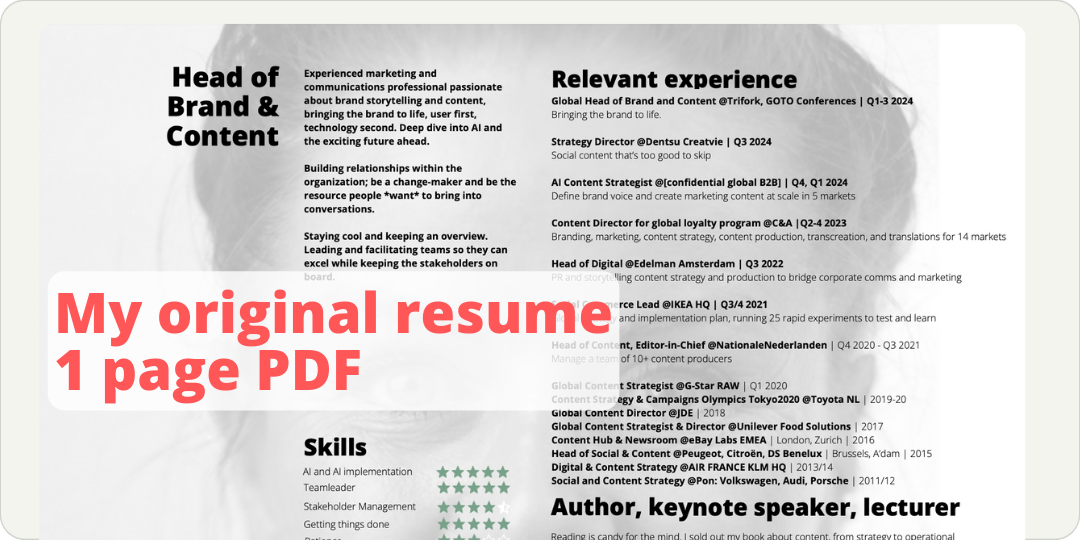
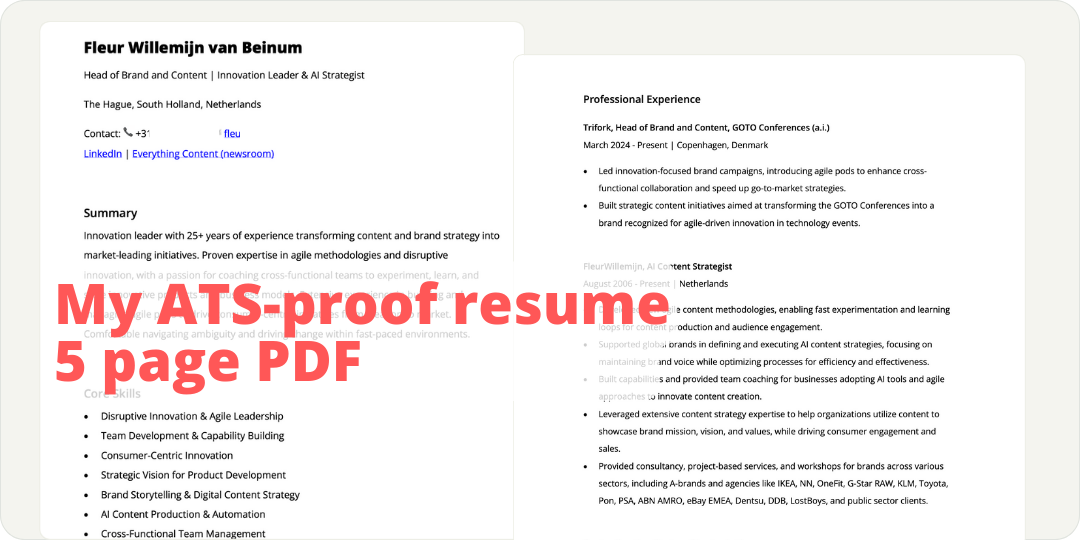
The first is a screenshot of my 1-pager, a beautifully designed resume in PDF. The second is ATS proof, boring, very clean, and a few pages, but if that is what gets me over the ATS wall, I'll settle with it.
→ The more plain and boring, the more the ATS likes it
1. Requirements for ATS-proof resumes
This is what matters if you want the ATS software to scan your resume easily and get seen by a human recruiter.
Simplify your formatting
Beautifully designes resumes with complex layouts, graphics, or unconventional fonts confuse ATS. What to do instead:
- Use default fonts and the standard layout for headers and sub-headers. Minimize your styling like bolding, italics, and underlining.
- Stick to standard section headings like ‘Work Experience,’ ‘Education,’ and ‘Skills’ to make sure the ATS can correctly identify each part of your resume.
- Avoid infographics, images, charts, or tables, as ATS has difficulty reading these.
The more plain and boring, the better. There are resume templates provided by Canva or Word. The ones with the nice two-column layout, I don’t know if it’s smart to use them. It looks nice, but…
- From your user perspective, it’s a hassle to create and adjust the document.
- From a hiring manager’s perspective, the cognitive load is high, it makes me search for relevant information in the document.
- From an ATS perspective, is the hierarchy clear and simple enough to scan and evaluate accordingly?
If my objective is to get past the ATS automation, I stick to a super simple, boring-looking text only PDF document. And honestly, this breaks my strategic, creative, and content heart, but it is what it is.
Optimize your keywords
Here’s the automation magic. The ATS software scans your resume based on the keywords in the job description to rank your application. It is a bit like SEO: the better the match, the higher the ranking.
- Match keywords: when you use the right skills, job titles, and qualifications in your resume, you tell the ATS, ‘Hey, I’m exactly what you’re looking for!’
- Be accurate, no keywords stuffing: don’t just plug in keywords for the sake of matching.
Use compatible filenaming
The naming of the file should be clear and straightforward: FirstName_LastName_Resume.pdf. No need to include a date or a version number, keep it as simple as possible.
2. Use AI and LinkedIn to ATS-proof your resume
This is what you need to do:
- Download your LinkedIn profile as a PDF; go to your profile, click on the ‘resources’ button in your bio, and ‘save to PDF’.
- Copy the job description.
- Go to AI and use a prompt similar to this: Imagine you want to apply for [job title]. Can you help me adjust my resume and make it ATS proof? Please use the job description below and my resume uploaded as a PDF. Job description: “ [paste the copied job description here] ” and upload your LinkedIn profile PDF in the same prompt.
- Check the response; seriously, AI can hallucinate and adjust your work experience freely. Make sure there are no lies and that what is written is accurate. Adjust if needed.
- Shift to Word: once you’re happy, copy the response and paste it into Word. You can also ask AI to create a .doc or PDF, but I noticed that sometimes that download is missing paragraphs.
- Adjust further by adding or deleting paragraphs. This manual edit makes it more authentic.
- Save as PDF: review and refine a bit more in Word and export as PDF.
Let’s be clear: ATS-proofing your resume is no guarantee of getting an invite; your experience and the human match still define success.
3. Prompts for your cover letter and highlighting skills
Stolen with pride, these prompts help you with finetuning your resume and communications. Please check the original post for all the prompts.
Resume summary section
’Create a compelling summary section for my resume that encapsulates my professional experience, key skills, and achievements, tailored to a [job position] role at [company] in the [industry] sector, while reflecting the [company culture/value].’
Cover letter
’Integrate key points from my resume into a cover letter paragraph that highlights my unique qualifications for the [job position] at [company], emphasizing my [specific skill/experience] that aligns with [company's mission/vision].’
Technical skills section (or other skills)
’Detail the technical skills, software proficiencies, and certifications that make me a strong candidate for the [job position] at [company]. Tailor the list to focus on tools and technologies emphasized in [industry/role-specific needs].’
Soft skills demonstration
’Craft impactful examples of how my soft skills, such as [communication, leadership, or teamwork], have driven positive outcomes, tailored for enhancing the soft skills section of my resume for a [job position] at [company].’
Feedback and revision suggestions
’Provide actionable feedback for revising my current resume to better align with a [job position] at [company]. Focus on improving [layout, language, and relevance to the role] while ensuring clarity and professionalism.’
How can I check if my resume is ATS-proof?
Simple, use a tool like Jobscan, Resume Worded, or Zety.
Now it’s all up to you.
Good luck!
Disclaimer: original publication date November 2024, updated in June 2026.
Join 2,500+ professionals
Most content advice tells you what to do. This tells you how to think. For marketers and communicators who want the difference.
Free. Unsubscribe anytime.
 Powered By PressPage