


How your work moves when you put AI at the core of your marketing processes
Now, I spend more time sparring with AI than writing with it
AI writes your draft in 90 seconds. But nobody tells you how much time and skill it takes for that draft to be any good.
When I used AI as ‘just a writing tool’, I didn’t give in to the temptation and I stubbornly stuck to starting every piece old school: with pen and paper. Handwriting the title in my own words. Scribbling down the reader’s problem, my solution, and why the reader should care. Once that was set, I opened AI and found the rest while drafting. By this rather old-fashioned start, I safeguarded the essence and my point of view.
→ Now that my workflow is built around AI, all of that thinking happens before AI writes the first word. My work moves from writing to thinking.
For the ‘9 AI dilemmas’ blog series, with AI at the core of the process, I spent about 4 hours on strategy and setting up, 3.5 of them sparring with AI to sharpen my thinking.
With that in place, the production of each piece in this series takes 3 to 5 hours from briefing to publishing, and my bar is much higher than when I wrote alone.
For a client team, the same setup cut a blog from 12 to 16 hours to 4 to 6.
How did I achieve this? I moved the sharpening that used to happen while writing to the front, on purpose.
How you use AI decides quality and time savings
The visual below shows the same piece of work in different stages: before AI, the expectations, AI bolted onto the old workflow, and AI at the core. There are 10 blocks of work as the starting point. All is illustrative, based on experiences with corporate clients and for my newsroom.
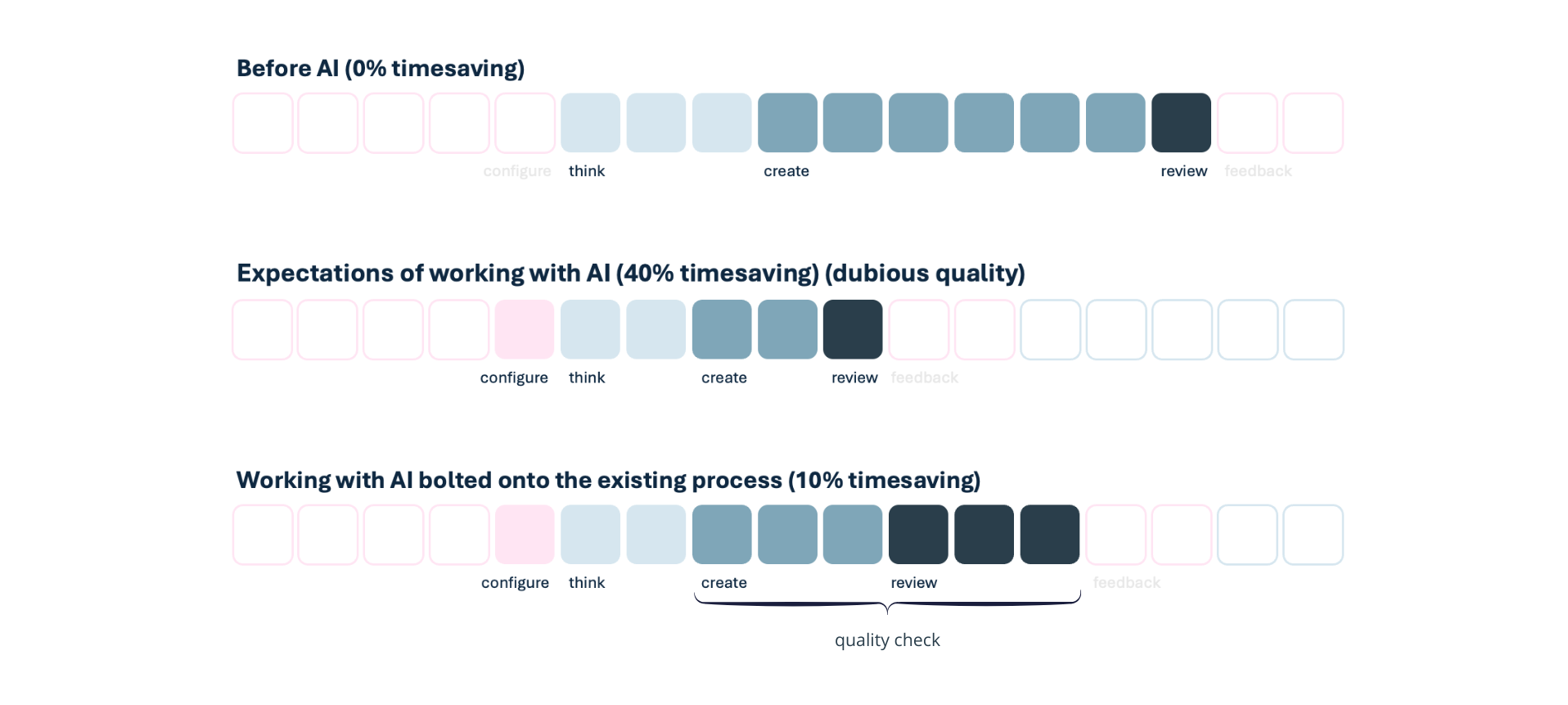
1. Without AI, the workload sits in creating.
2. Working with AI: the expectation is a big time saving. In this picture, 40% or more.
3. If you bolt AI onto your current workflow, the time AI saves on writing evaporates in reviewing: round after round of quality checks to stop it sounding generic.
In this picture it saves the least time, 10%, and it risks serious quality issues: shiny on the outside, empty on the inside.
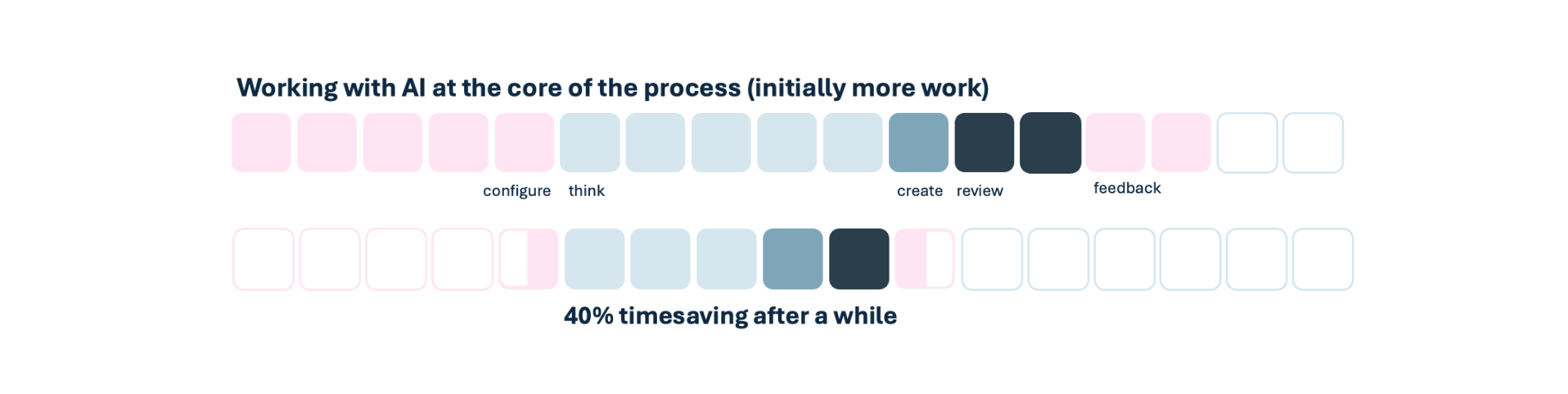
4. With AI at the core, the workload moves upfront: to configuring and thinking. That’s the homework. If you want to keep the quality high, you invest time before you save it. The first rounds can cost more than they save, especially the first time you build the setup.
The more you use it and give feedback, the better it gets, and the faster you get to work that’s high quality and on brand. At scale, the investment pays back.
4 hours of setup, once, for the whole series
For this ‘9 AI dilemmas’ series, I started by building a project in Claude. In Copilot I’ve built an agent for a specific campaign, which we share with the team. The idea is the same: one place where everything lives and links, a space to come back to, like a SharePoint folder for your files.
Then I sharpen the topic with AI: the strategy, the message, and the thinking underneath it. From the objective, the reader’s problems and how I solve them, the number of pieces. And the structure per piece to maintain consistency. I wrote down the detailed tone of voice, and how AI should work with me, pushback included.
I also created the visual brief and stress-tested it. I built all the checks, for another round of pushback, sanity check, and fit for my reader. And I set up the tracker to keep the overview and status, connected to the tools; Notion and Canva for me, SharePoint and Word for client work.
Time spent: 4 hours in total, once, for the whole series. 3.5 of them were thinking.
Four hours is fast. The first time, expect a few days.
Before, all of this lived in my head and took shape while working. Now it has to be written down, in words AI understands, before any of the production work starts.
There’s a catch. My best ideas often turn up on a run. I used to find the right words while I wrote. Now I find them in the reasoning with AI. Skip that step, and the idea stays in my head while the draft drifts.
Every piece starts with a debate
Before I start with a piece, I ask AI to suggest the exact topic, based on the strategic plan and what we’ve already created, but I decide.
Then the reasoning starts: 1 to 2 hours of arguments between me and AI is quite normal. Because I asked for pushback in the setup, I get it and AI doesn’t spare me. The title and bottom line of the piece always come first. If those are sharp, the rest flows. Otherwise, the article drifts.
Something I didn’t expect: my bar went up. I’m stricter on message and topic than when I wrote alone. I can’t fully explain why. Maybe because I have a knowledgeable sparring partner I can be brutally honest with, and trust. That only works because of the setup.
AI and I write together, and I still make the visuals by hand
AI follows the process I set at the start: based on the title and bottom line, we write the outline first. When that is set, we write the draft. We rewrite and sharpen it together. In the last step, we run the checks.
→ Outline, draft and rewrite takes 1 to 2 hours.
For the visuals, AI helps me to write the brief. I built in a feedback loop: AI checks the visuals of earlier pieces for consistency, because things change while working.
I design everything by hand, in Canva. I like this manual work, and AI-made visuals always lack a heartbeat.
To be honest, I’m also not that good at instructing AI on visual design, let alone getting it to adjust what it made. So I love working hybrid. Besides, Canva makes it so quick to resize for my website, LinkedIn, Medium and email.
The secret: AI runs the checks before anyone reviews
My drafts reach stakeholders close to approval. This is because of the checks that I built into the process.
- One looks for flaws in the reasoning
- One checks the fit with my audience
- One reasons from my stakeholders’ perspective
The biggest difference came from that stakeholder check. Before anything goes for approval, the agent answers one question: what feedback would the stakeholder give? The review happens before the review.
Last step: publication
The piece then lands in Notion automatically, through a process I set up at the start. I check it one more time by hand.
Then the publishing happens in 30 minutes, manually by me, in the CMS, optimising the copy for mobile and desktop. Around 20 mins go to design: visual anchor points that make the copy easy to skim and skip.
After every piece, the setup gets better
After publishing, I go back to the setup. I ask AI to check the latest status, and to update its memory and settings where needed.
→ The configuration is an ongoing process.
The same setup works for a team
What I do for my newsroom by myself, also works in an office and team setting. For one of my clients, I built a campaign agent with the same setup, and shared it with the whole team.
- Before, a blog or client case took around 12 to 16 hours from brief to approval, spread over 2 weeks to 6 months.
- Now with AI, it takes 4 to 6 hours, done in 2 days. Configuring the AI and process took about 4 hours: 2 upfront, the rest in small updates as we learned.
My advice
The sharpening that used to happen while writing now has to happen upfront, on purpose. Skip it, and nothing catches it. AI turns a thin brief into a fluent draft every time, and you end up with something anyone, or any AI, could have written. That’s not a time saving. That’s a brand problem.
There’s a quieter cost too. What you don’t make yourself doesn’t stick. You know the work less well, so you defend it less well: in the meeting, with the client, in front of the board. That’s why I still spend hours reasoning before a word is written. The thinking is where the piece becomes mine.
This also takes skills. You have to learn how to talk to machines and how to brief properly. My setup is quick because I’ve failed and learned. Working with AI isn’t buying a tool. It’s changing how you work.
If you want this setup for your team, I’ll build it with you, and teach you how to do it yourself and how to manage it.
9 AI dilemmas
This piece shows the work behind the 9 AI dilemmas sfor the C-suite. Each dilemma names the decision, what it costs to leave it open, and what I’d do.
The one you recognise immediately might be the one you’ve left open too long.
- Faster with AI means more errors
- Secure AI means weaker AI
- Your board wants AI to make marketing cheaper. Your brand can't afford it
Join 2,750+ professionals
AI changes how the work gets done. I test it in my own work and write about what actually works.
Free. Unsubscribe anytime.
 Powered By PressPage